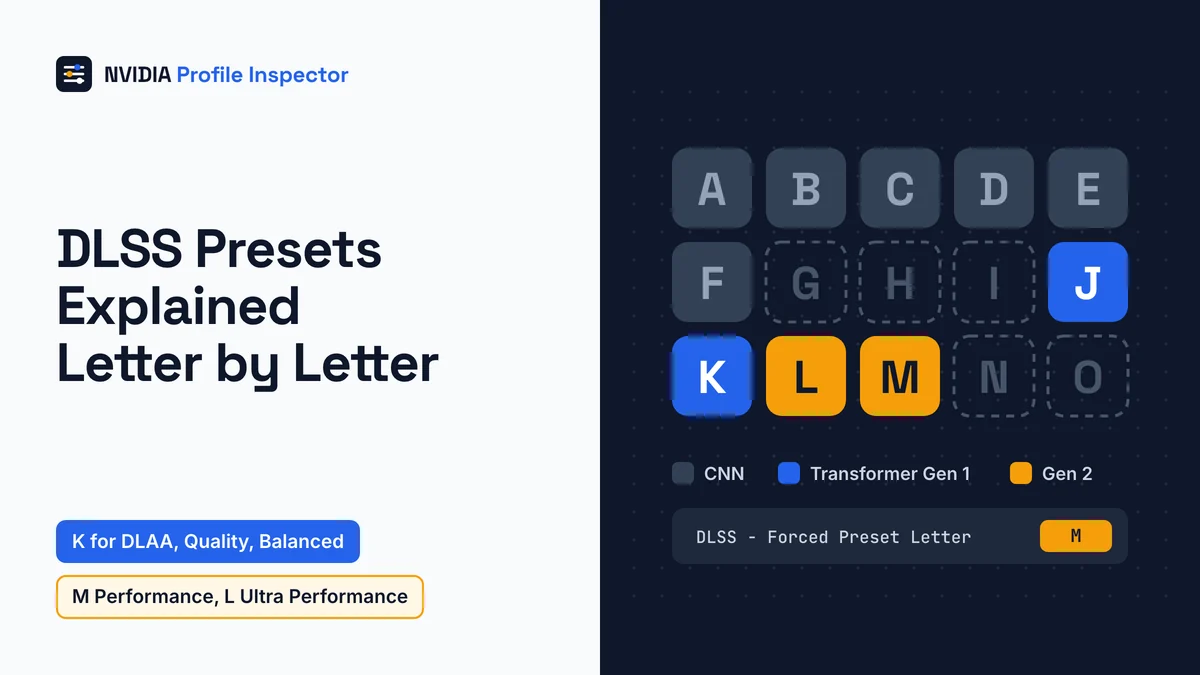
DLSS presets explained in one line: each letter names the AI model that DLSS Super Resolution runs. A to F are old CNN models, J and K the DLSS 4 transformer, and L and M DLSS 4.5. NVIDIA's defaults are K for DLAA, Quality and Balanced, M for Performance and L for Ultra Performance. On an RTX 20 or 30 card, stay on K unless you have frame rate to spare.
What are DLSS presets?
A DLSS preset is the trained model DLSS Super Resolution uses to rebuild each frame, named by a single letter. The preset is a separate choice from the quality mode, which sets the render resolution.
Where you set the letter
You pick the letter in one of two places. The NVIDIA App shows it as the DLSS Override - Model Preset box on its Graphics tab. In NVIDIA Profile Inspector, a free driver profile editor made by Orbmu2k rather than NVIDIA, the same choice is the DLSS - Forced Preset Letter row in group 05. Clicks, fixes and undo values for that row are on the Profile Inspector DLSS override walkthrough. Export a .nip backup of that game's profile before you switch letters, and to go back, reset the game profile to NVIDIA defaults.
DLSS presets vs DLSS quality modes
Quality, Balanced and Performance are quality modes, not presets. The mode sets the render resolution, and the preset letter picks the model that rebuilds the full image from it.
Wikipedia lists the divisor per axis: Quality divides each side by 1.5, Balanced by 1.72, Performance by 2 and Ultra Performance by 3. DLAA runs at native resolution. Those divisors give these render sizes, rounded to whole pixels.
| DLSS mode | Scale per axis | 1080p output | 1440p output | 4K output |
|---|---|---|---|---|
| DLAA | 100% | 1920x1080 | 2560x1440 | 3840x2160 |
| Quality | 66.7% | 1280x720 | 1707x960 | 2560x1440 |
| Balanced | 58.1% | 1116x628 | 1488x837 | 2233x1256 |
| Performance | 50% | 960x540 | 1280x720 | 1920x1080 |
| Ultra Performance | 33.3% | 640x360 | 853x480 | 1280x720 |
Fewer rendered pixels mean more FPS and more detail for the model to rebuild. NVIDIA tunes each new letter for certain modes, so the two choices work as a pair.
DLSS presets explained from A to O
Fifteen letters, A to O, sit in Profile Inspector's DLSS - Forced Preset Letter row (ID 0x10E41DF3). Only J, K, L and M are current transformer models, A to F are old CNN models, and NVIDIA describes no model for G, H, I, N or O. The letters follow the tool's own order, which lists N/A and Use recommended preset first.

| Letter | Profile Inspector label | Hex | Added in DLSS SDK | NVIDIA status now |
|---|---|---|---|---|
| A, B, C, D | Preset A to Preset D (CNN) | 0x00000001 to 0x00000004 | Before the 310.x notes | No longer available |
| E, F | Preset E, Preset F (CNN) | 0x00000005, 0x00000006 | Before the 310.x notes | Legacy, support deprecated |
| G, H, I | Preset G, H, I (unused) | 0x00000007 to 0x00000009 | None | Reserved, not for use |
| J | Preset J (Transformer Gen 1) | 0x0000000A | Not stated in the notes | Not listed in the guide |
| K | Preset K (Transformer Gen 1) | 0x0000000B | 310.2.1, April 2025 | Default for DLAA, Quality, Balanced |
| L | Preset L (Transformer Gen 2) | 0x0000000C | 310.5.0, January 2026 | Default for Ultra Performance |
| M | Preset M (Transformer Gen 2) | 0x0000000D | 310.5.0, January 2026 | Default for Performance |
| N, O | Preset N, Preset O (unused) | 0x0000000E, 0x0000000F | None | Not described by NVIDIA |
| None | Use recommended preset | 0x00FFFFFF | None | Driver picks a letter per mode |
| None | N/A | 0x00000000 | None | The game picks its own letter |
The labels and hex values come from build 3.0.2.1, released July 5, 2026. The status column comes from NVIDIA's Streamline DLSS guide v2.14.16, and the dates from NVIDIA's DLSS SDK release notes.
The letter row shares group 05 with the other DLSS settings in that group, such as the forced quality level and the switch that turns every mode into DLAA.
The spare letters are not secret, better models. NVIDIA's guide calls G to I reserved and says not to use them. The tool marks N and O unused too, so a forum post that praises them has nothing to back it.
E and F still come up in threads about older games and VR. NVIDIA's guide now calls them legacy presets with deprecated support, and it says A to D are no longer available.
DLSS transformer model vs CNN
The DLSS transformer model replaced the older convolutional neural network (CNN) models (Presets A to F) when DLSS 4 arrived in January 2025. Preset K followed in April 2025, and DLSS 4.5 added Presets L and M, a second transformer generation, in January 2026.

Wikipedia's DLSS timeline places the DLSS 4.5 reveal at CES. NVIDIA's SDK notes fill in the steps between. SDK 310.1.0 shipped the new Super Resolution transformer as a beta. SDK 310.3.0 took it out of beta, and SDK 310.5.0 added L and M.
A guide with DLSS presets explained before January 2025 can only list A to F, because the transformer letters came later. A game can still load a CNN letter from its own older DLSS file; the DLSS override walkthrough shows how to stop that.
DLSS preset K vs L vs M
Preset K is the DLSS 4 transformer and NVIDIA's default for DLAA, Quality and Balanced. Presets L and M are the DLSS 4.5 second-generation transformer, with M tuned for Performance mode and L for 4K Ultra Performance.

What is DLSS preset K?
Preset K carries the label Transformer Gen 1 in Profile Inspector. NVIDIA added it in DLSS SDK 310.2.1 in April 2025. The transformer model then left beta in SDK 310.3.0 in June 2025.
Preset J has the same Transformer Gen 1 label. NVIDIA's guide and default mapping use K, not J, and NVIDIA does not compare the two. Wikipedia describes J as sharper but less stable than K.
What is DLSS preset M?
NVIDIA says Preset M is optimized for DLSS Super Resolution Performance mode. Preset M also runs in Quality, Balanced and DLAA, but NVIDIA places its biggest gains in Performance and Ultra Performance. A hands-on report from XDA found that M tends to oversharpen the image.
DLSS preset L vs M
NVIDIA built Preset L for 4K output in Ultra Performance mode, while M targets Performance mode. In XDA's report, L gave the best image of the three but cost about 10% against K; M cost about 5%.
The cost depends on the card. NVIDIA's DLSS 4.5 launch article says the second-generation model uses five times the compute of the first transformer. NVIDIA calls the result a minor performance tradeoff on RTX 40 and 50 cards, while RTX 20 and 30 cards pay more because they lack native FP8.
Two outside reports measured the cost of L and M. Club386 saw at most 2.5% on an RTX 4090 at 1440p, against the 5% for M and 10% for L that XDA reported.
Which DLSS preset is best for your GPU?
The best DLSS preset for RTX 40 and 50 cards is NVIDIA's own mapping (K, M for Performance, L for Ultra Performance). For RTX 20 and 30 owners, NVIDIA's DLSS 4.5 Super Resolution notes say they may prefer K.

Each row pairs a DLSS mode with a letter for RTX 40 and 50 cards and one for RTX 20 and 30 cards.
| DLSS mode | Render scale per axis | RTX 40 and 50 pick | RTX 20 and 30 pick | Reason |
|---|---|---|---|---|
| DLAA | Native | K (L or M if you accept the cost) | K | NVIDIA default is K; L and M are supported |
| Quality | 1/1.5 | K (L or M optional) | K | Same default; XDA puts the cost of L and M at about 5 to 10% more than K |
| Balanced | 1/1.72 | K (L or M optional) | K | Same default |
| Performance | 1/2 | M | K, or M if the frame rate allows | M is tuned for Performance; it costs more on RTX 20 and 30 |
| Ultra Performance at 4K | 1/3 | L | K, or L if the frame rate allows | L is tuned for 4K Ultra Performance |
| Ultra Performance under 4K | 1/3 | L (NVIDIA default) | K | NVIDIA gives no separate pick under 4K |
Of K, L and M, K is the lightest letter. Still, the DLSS mode moves your FPS more than the letter does, because the mode sets the render resolution. Games differ as well, so change one letter at a time and compare in the same scene. Keep each test on that one game's profile, and check whether Profile Inspector is safe in games with anti-cheat before you play online.
The NVIDIA App's Recommended option applies this same mapping per mode, and how the NVIDIA App's Recommended setting and Profile Inspector overwrite each other matters if you run both.
Transformer model on RTX 20 and 30 series
Presets L and M do run on RTX 20 and 30 cards. Both letters cost more there because RTX 20 and 30 cards lack native FP8 support. RTX 40 and 50 cards use FP8 math to double the model's inference throughput. PauseHardware, a French hardware site, relays two unnamed owner tests. In one, an RTX 3060 at DLAA fell from 52 FPS with K to 38 FPS with L or M. If your frame rate has spare room, try M in Performance mode. Go back to K if the game stops feeling smooth.
What RR and FG preset letters mean
Ray Reconstruction (RR) letters A to C are CNN models, and D and E are the first transformer generation. SDK 310.2.1 added RR Preset E in April 2025, and SDK 310.9.1 added Preset F in September 2026. NVIDIA's DLSS 4.5 Ray Reconstruction uses Preset F, the second generation, which build 3.0.2.1 of July 5, 2026, still lists as Preset F (unused). Frame Generation (FG) shows Preset A and Preset B without labels. B arrived with User Interface Recomposition in DLSS SDK 310.6.0, so start on A and switch only if the HUD looks wrong. These lists are separate from the Super Resolution letters, so RR Preset F is not SR Preset F.
The FG letter only matters in games that ship DLSS Frame Generation. A game without it can still get generated frames from Smooth Motion, NVIDIA's driver-side option. The RR letter only takes effect when the game honors preset overrides, as the tool's settings file notes. The values for both lists sit with the DLSS override walkthrough. A fourth list, DLSS-NR - Forced Preset Letter, needs driver 610.47 and is named for DLSS Neural Rendering, the in-game name of DLSS 5. Its letters carry no model labels and NVIDIA publishes no mapping, so leave it at N/A.
FAQ
Is Performance with M better than Quality with K?
Performance with M and Quality with K run from different render sizes. At 1440p output, Performance draws 1280x720 while Quality draws 1707x960, so Performance with M gives more FPS from fewer pixels. NVIDIA tuned M for that mode. Compare both in the same scene, because only your screen shows which trade looks better.
Is preset L DLSS 4.5?
Yes. L and M are the two DLSS 4.5 Super Resolution letters, labeled Transformer Gen 2 in Profile Inspector. NVIDIA added both in DLSS SDK 310.5.0 on January 6, 2026, so the game must load a DLSS file of 310.5.0 or newer before either letter can run.
Is there a DLSS Ultra Quality mode?
Profile Inspector's DLSS - Forced Scaling Ratio list labels 77% as Ultra Quality (0x4D), between Quality at 67% and DLAA at 100%. You reach it only through a custom ratio, with DLSS - Forced Quality Level set to Custom on the game's profile.
Why does my game show preset F?
F is a legacy CNN letter some games still pick. With the letter row at N/A the game keeps it, as a user on driver 591.74 found in issue #381. Setting K, L or M in the row replaces it, and the fixes for settings that do not apply cover a letter that still will not load.
Conclusion
With DLSS presets explained as models and quality modes as render sizes, the right pick is a pairing of the two. RTX 40 and 50 cards do well on NVIDIA's mapping of K for DLAA, Quality and Balanced, M for Performance and L for Ultra Performance. On an RTX 20 or 30 card, start on K and move to M in Performance mode only when the frame rate has room. The mapping can shift with a new SDK, as it did when L and M joined K, so read the loaded letter off the DLSS overlay after every change.